跳转到主要内容
前端组件是直接在 Twenty 的 UI 内渲染的 React 组件。 它们在使用 Remote DOM 的隔离 Web Worker中运行——你的代码在沙盒中执行,但会原生渲染到页面中,而非在 iframe 里。

前端组件可用位置

在 Twenty 中,前端组件可在两个位置进行渲染:
  • 侧边栏 — 非无头的前端组件会在右侧侧边栏中打开。 当前端组件从命令菜单触发时,这是默认行为。
  • 小部件(仪表盘和记录页面) — 前端组件可以作为小部件嵌入到页面布局中。 在配置仪表盘或记录页面布局时,用户可以添加前端组件小部件。
单独存在的前端组件无法从界面中访问 —— 你需要将它呈现出来。 实现这一点有两种方式:
  • 将它与命令菜单项配对 —— 将其注册到命令菜单(Cmd+K)中,并可选地将其设为固定快速操作。
  • 将它作为小部件嵌入到页面布局 —— 将其放置在记录详情页面或仪表盘上。

基础示例

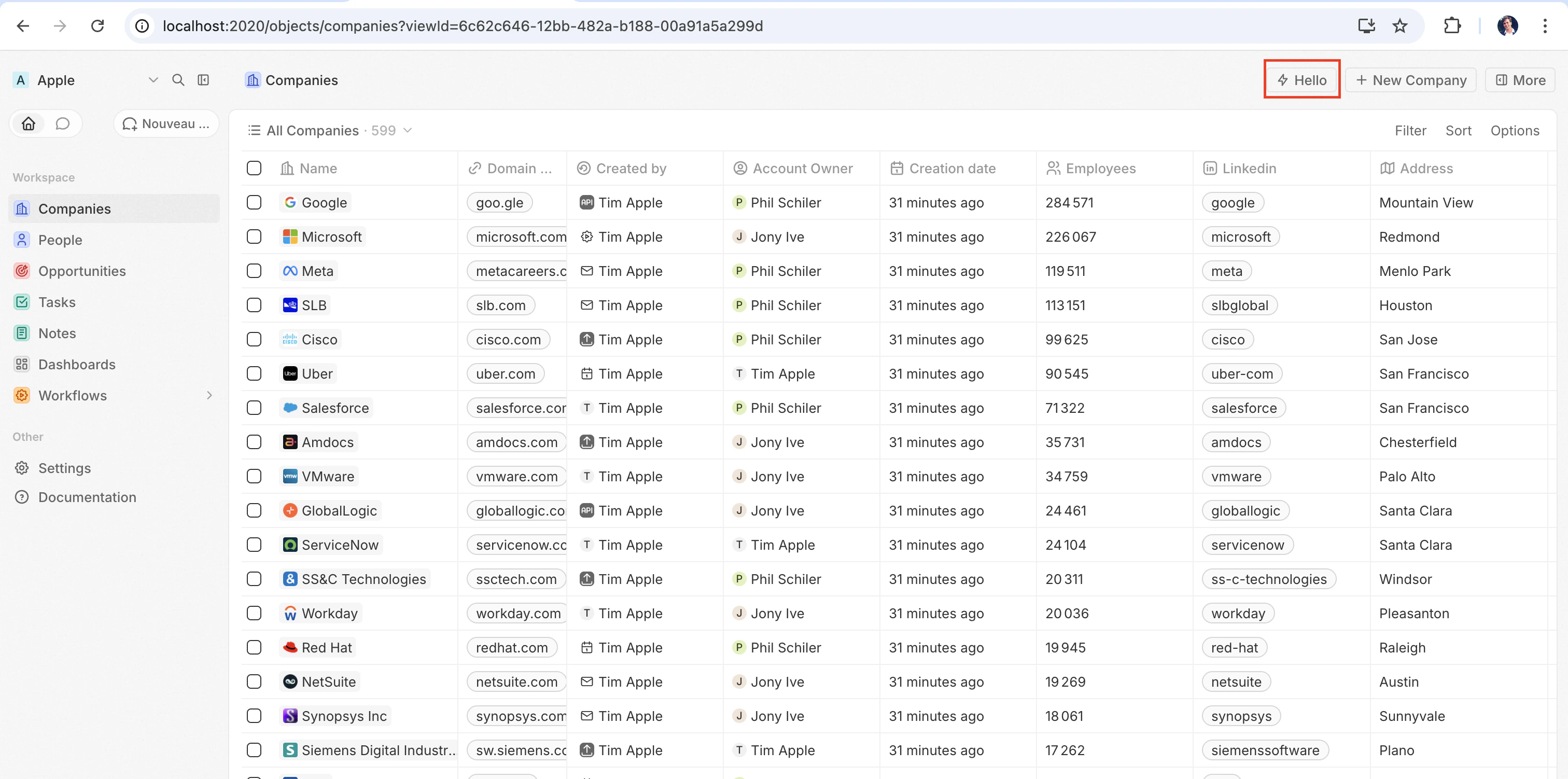
最快看到前端组件实际效果的方式是将它与defineCommandMenuItem配对,这样它就会显示为页面右上角的快速操作按钮:
src/front-components/hello-world.tsx
import { defineFrontComponent } from 'twenty-sdk/define';

const HelloWorld = () => {
  return (
    <div style={{ padding: '20px', fontFamily: 'sans-serif' }}>
      <h1>Hello from my app!</h1>
      <p>This component renders inside Twenty.</p>
    </div>
  );
};

export default defineFrontComponent({
  universalIdentifier: '74c526eb-cb68-4cf7-b05c-0dd8c288d948',
  name: 'hello-world',
  description: 'A simple front component',
  component: HelloWorld,
});
src/command-menu-items/hello-world.command-menu-item.ts
import { defineCommandMenuItem } from 'twenty-sdk/define';

export default defineCommandMenuItem({
  universalIdentifier: 'd4e5f6a7-b8c9-0123-defa-456789012345',
  shortLabel: 'Hello',
  label: 'Hello World',
  icon: 'IconBolt',
  isPinned: true,
  availabilityType: 'GLOBAL',
  frontComponentUniversalIdentifier: '74c526eb-cb68-4cf7-b05c-0dd8c288d948',
});
使用 yarn twenty dev 同步后(或单次运行 yarn twenty dev --once),快速操作会出现在页面右上角:
右上角的快速操作按钮
点击它以内联方式渲染该组件。

配置字段

字段必填描述
universalIdentifier该组件的稳定唯一 ID
component一个 React 组件函数
name显示名称
description组件的功能描述
isHeadless如果组件没有可见的 UI,则设为 true(见下文)

在页面上放置前端组件

除了命令之外,你还可以在页面布局中将其添加为小部件,从而将前端组件直接嵌入记录页面。 详情请参见页面布局

无头与非无头

前端组件有两种由 isHeadless 选项控制的渲染模式: 非无头(默认) — 该组件会渲染可见的 UI。 从命令菜单触发时,它会在侧边栏中打开。 当 isHeadlessfalse 或被省略时,这是默认行为。 无头 (isHeadless: true) — 该组件会在后台以不可见的方式挂载。 它不会打开侧边栏。 无头组件旨在用于执行逻辑后自行卸载的操作——例如运行异步任务、导航到某个页面或显示确认模态框。 它们与下文介绍的 SDK Command 组件天然契合。
src/front-components/sync-tracker.tsx
import { defineFrontComponent } from 'twenty-sdk/define';
import { useRecordId, enqueueSnackbar } from 'twenty-sdk/front-component';
import { useEffect } from 'react';

const SyncTracker = () => {
  const recordId = useRecordId();

  useEffect(() => {
    enqueueSnackbar({ message: `Tracking record ${recordId}`, variant: 'info' });
  }, [recordId]);

  return null;
};

export default defineFrontComponent({
  universalIdentifier: '...',
  name: 'sync-tracker',
  description: 'Tracks record views silently',
  isHeadless: true,
  component: SyncTracker,
});
由于该组件返回 null,Twenty 会跳过为其渲染容器——布局中不会出现空白区域。 该组件仍可访问所有 hooks 和宿主通信 API。

SDK Command 组件

twenty-sdk 包提供了四个为无头前端组件设计的 Command 辅助组件。 每个组件都会在挂载时执行一个操作,通过显示 snackbar 通知来处理错误,并在完成后自动卸载该前端组件。 twenty-sdk/command 导入它们:
  • Command — 通过 execute 属性运行异步回调。
  • CommandLink — 导航到某个应用路径。 属性:toparamsqueryParamsoptions
  • CommandModal — 打开一个确认模态框。 如果用户确认,则执行 execute 回调。 属性:titlesubtitleexecuteconfirmButtonTextconfirmButtonAccent
  • CommandOpenSidePanelPage — 打开特定的侧边栏页面。 属性:pagepageTitlepageIcon
下面是一个完整示例:无头前端组件使用 Command 从命令菜单运行一个操作:
src/front-components/run-action.tsx
import { defineFrontComponent } from 'twenty-sdk/define';
import { Command } from 'twenty-sdk/command';
import { CoreApiClient } from 'twenty-sdk/clients';

const RunAction = () => {
  const execute = async () => {
    const client = new CoreApiClient();

    await client.mutation({
      createTask: {
        __args: { data: { title: 'Created by my app' } },
        id: true,
      },
    });
  };

  return <Command execute={execute} />;
};

export default defineFrontComponent({
  universalIdentifier: 'e5f6a7b8-c9d0-1234-efab-345678901234',
  name: 'run-action',
  description: 'Creates a task from the command menu',
  component: RunAction,
  isHeadless: true,
});
src/command-menu-items/run-action.command-menu-item.ts
import { defineCommandMenuItem } from 'twenty-sdk/define';

export default defineCommandMenuItem({
  universalIdentifier: 'f6a7b8c9-d0e1-2345-fabc-456789012345',
  label: 'Run my action',
  icon: 'IconPlayerPlay',
  frontComponentUniversalIdentifier: 'e5f6a7b8-c9d0-1234-efab-345678901234',
});
另一个示例:使用 CommandModal 在执行前请求确认:
src/front-components/delete-draft.tsx
import { defineFrontComponent } from 'twenty-sdk/define';
import { CommandModal } from 'twenty-sdk/command';

const DeleteDraft = () => {
  const execute = async () => {
    // perform the deletion
  };

  return (
    <CommandModal
      title="Delete draft?"
      subtitle="This action cannot be undone."
      execute={execute}
      confirmButtonText="Delete"
      confirmButtonAccent="danger"
    />
  );
};

export default defineFrontComponent({
  universalIdentifier: 'a7b8c9d0-e1f2-3456-abcd-567890123456',
  name: 'delete-draft',
  description: 'Deletes a draft with confirmation',
  component: DeleteDraft,
  isHeadless: true,
});

调用逻辑函数

前端组件在沙盒 Web Worker 中于浏览器端运行,而逻辑函数在服务器端运行。 二者之间没有直接的进程内调用——前端组件通过 HTTP 访问逻辑函数。 使用 httpRouteTriggerSettings 声明的逻辑函数会通过 /s/ 端点暴露在 ${TWENTY_API_URL}/s\<path> 下。 你的前端组件使用来自 twenty-client-sdk/restRestApiClient 调用该路由,该客户端会使用 Twenty 注入到 worker 中的 TWENTY_APP_ACCESS_TOKEN 进行身份验证。 RestApiClient 正是为这种场景而构建的。 它会从 worker 环境中读取 TWENTY_API_URLTWENTY_APP_ACCESS_TOKEN,附加 Authorization: Bearer 请求头,对 JSON 进行序列化和解析,并在 token 或 URL 缺失或响应为非 2xx 时抛出 RestApiClientError——这样你就不必在每个组件中重复实现这些样板逻辑。 无头前端组件可以通过 Command 组件在挂载时执行调用,然后自动卸载:
src/front-components/sync-prs.tsx
import { defineFrontComponent } from 'twenty-sdk/define';
import { Command } from 'twenty-sdk/command';
import { RestApiClient } from 'twenty-client-sdk/rest';

const SyncPrs = () => {
  const execute = async () => {
    const client = new RestApiClient();

    await client.post('/s/github/fetch-prs', {
      owner: 'twentyhq',
      repo: 'twenty',
    });
  };

  return <Command execute={execute} />;
};

export default defineFrontComponent({
  universalIdentifier: '...',
  name: 'sync-prs',
  description: 'Triggers the fetch-prs logic function',
  isHeadless: true,
  component: SyncPrs,
});
传递给客户端的路径是该路由的公共路径——逻辑函数的 httpRouteTriggerSettings.path,并以 /s 作为前缀。 保持 isAuthRequired: true;客户端会为你的组件提供由 Twenty 签发的应用访问令牌:
src/logic-functions/fetch-prs.logic-function.ts
import { defineLogicFunction } from 'twenty-sdk/define';
import type { RoutePayload } from 'twenty-sdk/logic-function';

const handler = async (event: RoutePayload) => {
  const { owner, repo } = (event.body ?? {}) as { owner: string; repo: string };
  // ...fetch from GitHub and persist records...
  return { ok: true };
};

export default defineLogicFunction({
  universalIdentifier: '...',
  name: 'fetch-prs',
  handler,
  httpRouteTriggerSettings: {
    path: '/github/fetch-prs',
    httpMethod: 'POST',
    isAuthRequired: true,
  },
});
TWENTY_API_URLTWENTY_APP_ACCESS_TOKEN 会被自动注入——参见 应用变量。 由于机密应用变量永远不会暴露给前端组件,请将 API 密钥和其他敏感逻辑保留在逻辑函数中,而不是前端组件中。

RestApiClient 参考

twenty-client-sdk/rest 中导入 RestApiClient。 它与 CoreApiClientMetadataApiClient 属于同一客户端家族,但目标是你应用的 HTTP 路由,而不是 GraphQL API。
方法描述
get(path, options?)发送一个 GET 请求
post(path, body?, options?)发送一个 POST 请求
put(path, body?, options?)发送一个 PUT 请求
patch(path, body?, options?)发送一个 PATCH 请求
delete(path, options?)发送一个 DELETE 请求
request(method, path, options?)使用任意 HTTP 方法的通用请求
options 接受 headersquery(查询字符串参数记录;空值会被跳过),以及通过 signal 传入的 AbortSignal。 非 FormData 类型的对象 body 会被自动进行 JSON 序列化。 在收到 401 时,客户端会通过宿主刷新一次访问令牌,然后重试该请求。 基础 URL 和令牌默认会从环境中解析得到。 在需要时将覆盖项传递给构造函数——例如在测试中:
const client = new RestApiClient({
  baseUrl: 'https://api.example.com',
  token: 'my-token',
});
失败的请求会抛出 RestApiClientError,其中包含 statusstatusTexturl 和已解析的 body
import { RestApiClient, RestApiClientError } from 'twenty-client-sdk/rest';

const client = new RestApiClient();

try {
  const prs = await client.get('/s/github/fetch-prs', {
    query: { state: 'open' },
  });
} catch (error) {
  if (error instanceof RestApiClientError) {
    console.error(error.status, error.body);
  }
}

访问运行时上下文

在组件内部,使用 SDK 的 hooks 获取当前用户、记录和组件实例:
src/front-components/record-info.tsx
import { defineFrontComponent } from 'twenty-sdk/define';
import {
  useUserId,
  useRecordId,
  useFrontComponentId,
} from 'twenty-sdk/front-component';

const RecordInfo = () => {
  const userId = useUserId();
  const recordId = useRecordId();
  const componentId = useFrontComponentId();

  return (
    <div>
      <p>User: {userId}</p>
      <p>Record: {recordId ?? 'No record context'}</p>
      <p>Component: {componentId}</p>
    </div>
  );
};

export default defineFrontComponent({
  universalIdentifier: 'b2c3d4e5-f6a7-8901-bcde-f23456789012',
  name: 'record-info',
  component: RecordInfo,
});
可用的 hooks:
钩子返回值描述
useUserId()stringnull当前用户的 ID
useSelectedRecordIds()字符串[]所有已选择的记录 ID(如果未选择,则为空数组)
useRecordId()stringnull已弃用。 请改用 useSelectedRecordIds()
useFrontComponentId()string此组件实例的 ID
useColorScheme()'light''dark'宿主 UI 当前的配色方案(System 已解析)
useFrontComponentExecutionContext(selector)因情况而异使用选择器函数访问完整的执行上下文

应用程序变量

defineApplication() 中定义、且 isSecret: false 的应用程序变量,可以通过 getApplicationVariable 实用工具在前端组件中使用:
src/front-components/greeting.tsx
import { defineFrontComponent } from 'twenty-sdk/define';
import { getApplicationVariable } from 'twenty-sdk/front-component';

const Greeting = () => {
  const recipientName = getApplicationVariable('DEFAULT_RECIPIENT_NAME') ?? 'World';

  return <p>Hello, {recipientName}!</p>;
};

export default defineFrontComponent({
  universalIdentifier: '...',
  name: 'greeting',
  component: Greeting,
});
机密变量(isSecret: true不会暴露给前端组件。 它们仅在服务器端运行的 逻辑函数 中可用。 这可以防止诸如 API 密钥之类的敏感值被发送到浏览器。
以下系统变量始终可以通过 process.env 获取:
变量描述
TWENTY_API_URLTwenty API 的基础 URL
TWENTY_APP_ACCESS_TOKEN限定在你的应用角色范围内的短期令牌

宿主通信 API

前端组件可以使用来自 twenty-sdk 的函数触发导航、模态框和通知:
函数描述
navigate(to, params?, queryParams?, options?)在应用中导航到某个页面
openSidePanelPage(params)打开侧边栏
closeSidePanel()关闭侧边栏
openCommandConfirmationModal(params)显示确认对话框
enqueueSnackbar(params)显示一条 Toast 通知
unmountFrontComponent()卸载该组件
updateProgress(progress)更新进度指示器
下面是一个示例,使用宿主 API 在操作完成后显示一条 snackbar 并关闭侧边栏:
src/front-components/archive-record.tsx
import { defineFrontComponent } from 'twenty-sdk/define';
import { useRecordId } from 'twenty-sdk/front-component';
import { enqueueSnackbar, closeSidePanel } from 'twenty-sdk/front-component';
import { CoreApiClient } from 'twenty-sdk/clients';

const ArchiveRecord = () => {
  const recordId = useRecordId();

  const handleArchive = async () => {
    const client = new CoreApiClient();

    await client.mutation({
      updateTask: {
        __args: { id: recordId, data: { status: 'ARCHIVED' } },
        id: true,
      },
    });

    await enqueueSnackbar({
      message: 'Record archived',
      variant: 'success',
    });

    await closeSidePanel();
  };

  return (
    <div style={{ padding: '20px' }}>
      <p>Archive this record?</p>
      <button onClick={handleArchive}>Archive</button>
    </div>
  );
};

export default defineFrontComponent({
  universalIdentifier: 'c9d0e1f2-a3b4-5678-cdef-789012345678',
  name: 'archive-record',
  description: 'Archives the current record',
  component: ArchiveRecord,
});

处理多个记录

使用 useSelectedRecordIds() 来处理多个已选记录。 这对于批量操作很有用:
src/front-components/bulk-export.tsx
import { defineFrontComponent, numberOfSelectedRecords } from 'twenty-sdk/define';
import { useSelectedRecordIds } from 'twenty-sdk/front-component';
import { enqueueSnackbar, closeSidePanel } from 'twenty-sdk/front-component';
import { CoreApiClient } from 'twenty-sdk/clients';

const BulkExport = () => {
  const selectedRecordIds = useSelectedRecordIds();

  const handleExport = async () => {
    const client = new CoreApiClient();

    for (const recordId of selectedRecordIds) {
      await client.mutation({
        updateTask: {
          __args: { id: recordId, data: { exported: true } },
          id: true,
        },
      });
    }

    await enqueueSnackbar({
      message: `Exported ${selectedRecordIds.length} records`,
      variant: 'success',
    });

    await closeSidePanel();
  };

  return (
    <div style={{ padding: '20px' }}>
      <p>Export {selectedRecordIds.length} selected record(s)?</p>
      <button onClick={handleExport}>Export</button>
    </div>
  );
};

export default defineFrontComponent({
  universalIdentifier: 'd0e1f2a3-b4c5-6789-defa-012345678901',
  name: 'bulk-export',
  description: 'Export selected records',
  component: BulkExport,
  command: {
    universalIdentifier: 'd0e1f2a3-b4c5-6789-defa-012345678902',
    label: 'Bulk Export',
    availabilityType: 'RECORD_SELECTION',
    conditionalAvailabilityExpression: numberOfSelectedRecords > 0,
  },
});

公共资源

前端组件可以使用 getPublicAssetUrl 访问应用的 public/ 目录中的文件:
import { defineFrontComponent } from 'twenty-sdk/define';
import { getPublicAssetUrl } from 'twenty-sdk/utils';

const Logo = () => <img src={getPublicAssetUrl('logo.png')} alt="Logo" />;

export default defineFrontComponent({
  universalIdentifier: '...',
  name: 'logo',
  component: Logo,
});
详情请参见公共资源部分

样式

前端组件支持多种样式方案。 你可以使用:
  • 内联样式style={{ color: 'red' }}
  • Twenty UI 组件 — 从 twenty-sdk/ui 导入(Button、Tag、Status、Chip、Avatar 等)
  • Emotion — 使用 @emotion/react 的 CSS-in-JS
  • Styled-componentsstyled.div 模式
  • Tailwind CSS — 工具类
  • 任何 CSS-in-JS 库(与 React 兼容)
import { defineFrontComponent } from 'twenty-sdk/define';
import { Button, Tag, Status } from 'twenty-sdk/ui';

const StyledWidget = () => {
  return (
    <div style={{ padding: '16px', display: 'flex', gap: '8px' }}>
      <Button title="Click me" onClick={() => alert('Clicked!')} />
      <Tag text="Active" color="green" />
      <Status color="green" text="Online" />
    </div>
  );
};

export default defineFrontComponent({
  universalIdentifier: 'e5f6a7b8-c9d0-1234-efab-567890123456',
  name: 'styled-widget',
  component: StyledWidget,
});